Learn how to build a voice call automation with Circle Agent Wallet, AI assistants, and USDC to pay for services, place calls, and return proof of execution.

Agent workflows are easy to execute when they only generate text. They become harder when the agent needs to complete a real task end to end: find a service, pay for it, use it, and return proof of what happened.
That is where many developer workflows break. The model may know the next step, but the application still depends on manual setup: creating accounts, adding payment methods, managing API keys, buying credits, checking balances, and stitching together receipts.
Circle Agent Wallet helps developers build more autonomous applications by giving agents the ability to pay for services with USDC as a part of their workflow. Instead of relying on a subscription set up ahead of time, the agent can pay for access when it needs it. This unlocks composable workflows where agents can discover, purchase, and consume services on demand
Consider a workflow where an AI agent monitors market conditions and needs to notify you immediately when sentiment changes. An email or dashboard notification may be too easy to miss, so the agent decides to place a phone call instead. To complete that task autonomously, it needs to acquire or reuse a phone number, pay for a voice API, initiate the call, and then return the call transcript, recording URL, and payment details. Rather than requiring a preconfigured account with the voice provider, the agent can pay for the service with USDC at the moment it needs it, allowing the entire workflow to execute autonomously from start to finish.
Circle Agent Wallet works across AI coding tools and agent runtimes that can run Circle CLI commands or integrate Circle APIs. In this tutorial, we use Codex and Circle Agent Wallet to build that workflow end to end.
You will build a workflow that:
- uses Circle Agent Wallet to pay for the services needed to place a call
- delivers a short market sentiment update to your phone
- returns the transcript, recording URL, and spend details for review
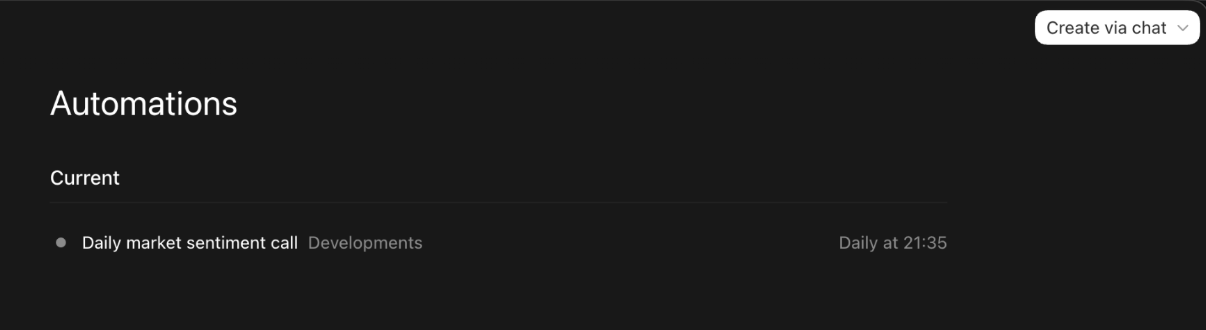
- runs the flow as a thread-bound heartbeat automation in Codex
TL;DR setup
If you want to try it first and read the breakdown after, start with this prompt in Codex:
Use Circle Agent Wallet to set up a recurring voice-call workflow in this Codex thread.

Config:
- Your email: <EMAIL>
- Destination phone: <PHONE_NUMBER>
- Schedule: <SCHEDULE>
- Auto top-up: 0.65 USDC per run, only if needed
- Spending limits: calls up to $0.54 are approved; phone numbers up to $5.00 are approved only during setup; ask before anything higher or different.

Goal:
Call the destination with a short crypto market sentiment brief, then return transcript, recording URL, call status, and spend details.

Setup:
1. Check Circle CLI is installed.
2. Check Circle Agent Wallet auth; if needed, start login and ask me for OTP.
3. List my Base Agent Wallet address.
4. Check Base USDC, service-chain USDC, and Circle Gateway balances.
5. Search for a paid voice-call service that supports my destination number; do not assume Base works for all countries.
6. Reuse an active wallet-owned phone number if available. If none exists, estimate cost and ask before buying.
7. Estimate call cost.
8. Place one short test call only after I confirm.

Call style:
Short, clear, neutral crypto market sentiment brief. Avoid hype. End cleanly. Max 1 minute.

After the first successful call:
Create a thread-bound heartbeat automation for the schedule above, continuing this same chat context.

On each heartbeat:
1. Re-check auth, wallet address, balances, Gateway balance, caller ID, and call price.
2. Auto top-up only within the configured top-up limit if Gateway is low.
3. Place exactly one scheduled call if all checks pass.
4. Pause and ask if auth expired, terms are required, funds are insufficient, price changed, or phone number purchase/renewal is needed.
5. Return wallet status, services used, paid ledger, caller ID, call ID, status, transcript, recording URL, and total spend.

Do not accept terms, buy/renew numbers outside setup, exceed spending limits, or place extra calls without required confirmation.
The rest of this guide explains how the setup works and what to expect.
Why Circle Agent Wallet is part of this workflow
Without a wallet, a workflow like this usually breaks into separate manual steps:
- sign up for a telephony provider
- add a payment method
- buy a phone number
- provision the service
- trigger the call
- track what was spent
Circle Agent Wallet changes that by giving the agent a way to hold USDC, apply spending limits, and pay for services in the flow of the task. Because USDC is programmable, the agent can acquire resources and complete work without a human manually provisioning every account or payment step.
Prerequisites
Before you begin, make sure you have:
- Access to the Codex app
- Automations available in Codex
- Node.js v20.18.2 or later
- Circle CLI installed
- A Circle Agent Wallet with up to 6 USDC available on Base or the chain required by the selected service
- A Circle Gateway balance, or a USDC wallet balance to top up Gateway when needed. Some paid services may use Circle Gateway for payment. Gateway is separate from your wallet balance: your wallet holds USDC onchain, while Gateway can make that USDC available for fast service payments across supported chains.
Circle Agent Wallets require human authentication for key actions—including creating a wallet and adding or updating spending policies—to ensure agents operate within user-defined rules and controls. Authentication is email OTP-based, and sessions expire after 28 days, so the initial setup and periodic re-authentication will require your input.
Step 1: Set up your Circle Agent Wallet
Install Circle CLI:
npm install -g @circle-fin/cli
Authenticate your wallet:
circle wallet login [email protected]Get your wallet address on Base:
circle wallet list --type agent --chain BASEFund the wallet with USDC:
circle wallet fund --address 0xYourWalletAddress --chain BASE --amount 10 --method cryptoCheck the balance:
circle wallet balance --address 0xYourWalletAddress --chain BASEStep 2: Understand how the payment step works
Circle CLI supports x402-compatible paid requests with:
circle services pay <url> --address 0xYourWalletAddress --chain <SERVICE_CHAIN>
The service chain depends on the provider. For example, A voice-call service may accept payments on Polygon even if your Agent Wallet is funded on Base. Circle Gateway’s unified balance handles the crosschain transfer automatically.
For this voice workflow, those paid steps may include:
- checking or reusing a wallet-owned phone number
- buying a phone number if no active one exists
- topping up Circle Gateway for nanopayments
- placing the outbound call
Step 3: Run the prompt in Codex
Now ask Codex to set up the workflow. The prompt should tell Codex to:
- check that Circle CLI and Circle Agent Wallet are ready
- find a voice-call service that can call your phone number
- reuse an existing wallet-owned caller ID, or ask before buying one
- estimate costs before paying
- place one short test call only after you confirm
- return the call transcript, recording URL, status, and spend details
- create a thread-bound heartbeat automation after the first successful call
A simplified starter prompt looks like this:
Use Circle Agent Wallet to set up a recurring voice-call workflow in this Codex thread.

Call <PHONE_NUMBER> with a short crypto market sentiment brief. First check that Circle CLI, wallet auth, wallet balances, and Circle Gateway are ready. Find a paid voice-call service that supports the destination number. Reuse an active wallet-owned caller ID if available, or ask before buying one.

Before placing the first call, estimate the phone-number and call costs, then ask me to confirm. After a successful test call, create a thread-bound heartbeat automation for <SCHEDULE> so future runs continue from this same chat context.

Each run should return wallet status, services used, paid-call ledger, caller ID, call ID, call status, transcript, recording URL, and total spend.

Keep the call short, neutral, and hype-free. Do not accept terms, buy or renew numbers, fund the wallet, exceed expected costs, or place calls unless confirmation is required and given.
Step 4: Turn the task into a thread-bound heartbeat
After the first successful call, create a thread-bound heartbeat automation, not a separate cron automation.
This keeps future runs in the same Codex chat context, so the workflow can reuse discovered states like the wallet address, caller ID, provider endpoint, payment chain, and spending policy.
Step 5: Review the call outputs
A strong run should return:
- wallet status
- services used
- paid-call ledger
- purchased phone number
- call ID
- transcript
- recording URL
- total spend
What success looks like
A good run should feel simple from your side:
- Codex checks whether the wallet is ready
- Codex finds and pays for the required services
- Codex places the call
- you receive the update
- Codex returns the transcript, recording URL, and spend summary
Alternative patterns
For recurring market briefings, you can run the workflow every morning or every week with different prompts. For escalation workflows, you can trigger the call only when something important happens.
Wrapping up
In this tutorial, you used an AI development tool and Circle Agent Wallet to build a recurring voice call automation that can pay for the resources it needs, place a call, and return the resulting artifacts for review.
This is the larger shift behind agent commerce: agents are moving from planning work to completing work. Programmable USDC gives agents a way to acquire services, operate within user-defined spending limits, and return payment records as part of the task.
To keep building, explore:
USDC is issued by regulated affiliates of Circle. See Circle’s list of regulatory authorizations.
Circle Wallets and Agent Stack are provided by Circle Technology Services, LLC (“CTS”). CTS is a software provider and does not provide regulated financial or advisory services. You are solely responsible for services you provide to users, including obtaining any necessary licenses or approvals and otherwise complying with applicable laws. For additional details, refer to the Circle Developer Terms of Service. Agent Stack enables users and developers to interact with third-party applications and services, which are not controlled by Circle. Transactions initiated by agents are executed based on user-defined permissions and may occur without real-time human review. Circle does not guarantee the performance, availability, or outcomes of any third-party services or agent-initiated transactions. Users are solely responsible for their use of these tools and for evaluating associated risks.
Arc testnet provided by Circle Technology Services, LLC, a software provider. Not a financial or advisory service. Not reviewed or approved by NYDFS. Users responsible for their own compliance. See arc.network for more.