Learn how to monetize an API with Gateway, accept USDC nanopayments from AI agents, and withdraw seller revenue to a Payout Wallet on Arc Testnet.
Most APIs are built for humans using API keys, not agents.
As AI agents become economic actors, they need more than an endpoint to call. They need a way to discover and evaluate a service, read the price, pay for access, and keep moving through the task without waiting for a human to approve every step.
That changes what it means to publish an API.
The API can become more than a developer integration. It can become a storefront for agents.
An agent should be able to ask for a resource, receive a 402 Payment Required response, pay with USDC, and continue the task once the resource is returned.
Agent Stack gives this workflow a practical surface. Agent Wallets let agents hold and transact assets autonomously within predefined policies. Agent Marketplace gives services a place to be discovered, evaluated, and paid for by agents. Gateway provides the x402 payment flow for USDC nanopayments, so an API can ask for payment with `402 Payment Required` and settle in USDC.
For the seller, the shape is direct: publish a paid endpoint, accept USDC payments from AI agents, receive revenue in the Seller Wallet's Gateway Balance, then withdraw earnings to a Payout Wallet.
In this blog, we will walk through the seller side on Arc Testnet: monetize one API endpoint, accept USDC payments from agents through Gateway, check revenue in the Seller Wallet's Gateway Balance, and withdraw revenue to a Payout Wallet.
The Seller Flow
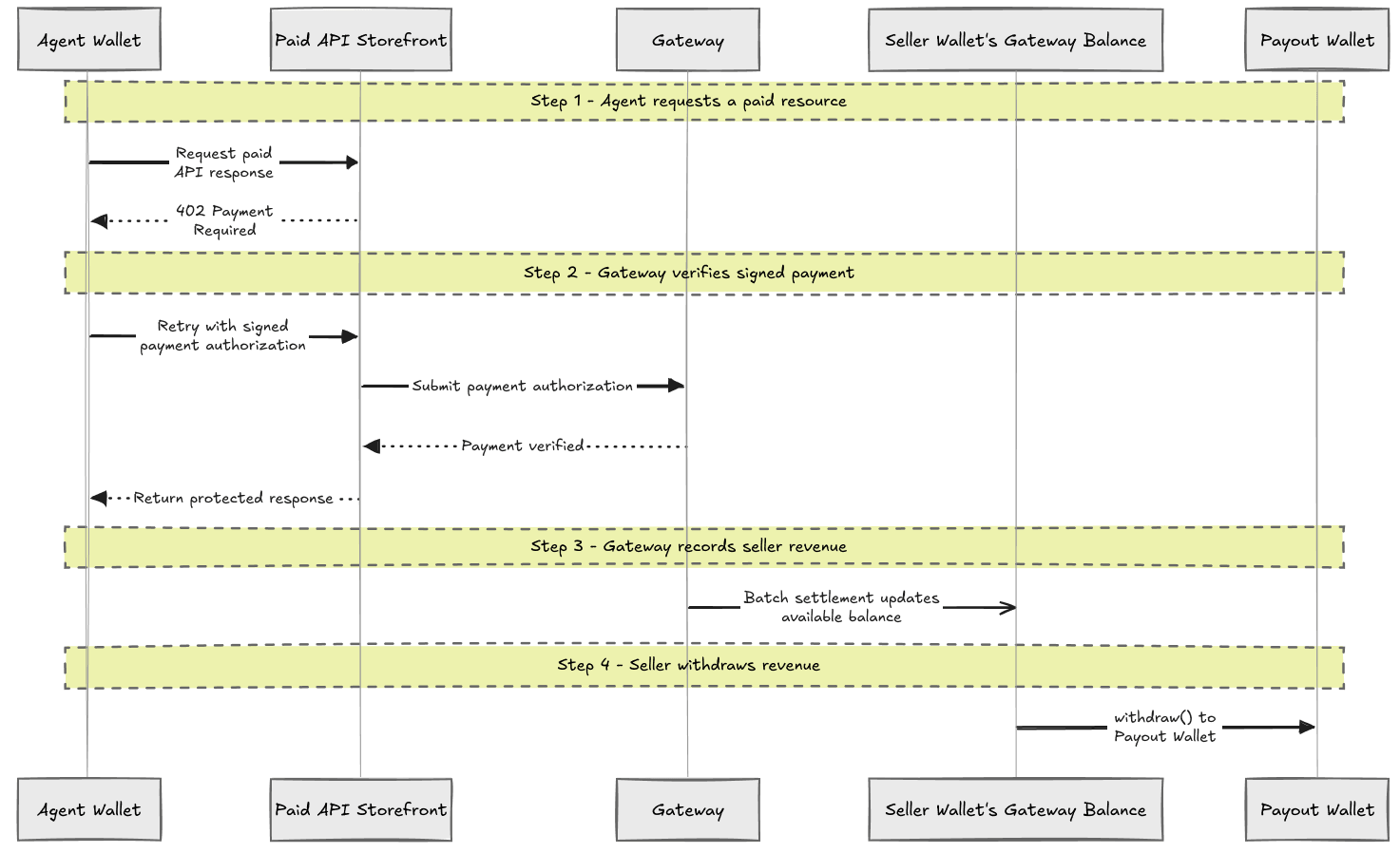
The seller flow has four steps: an Agent Wallet requests a paid resource, the agent retries with a signed payment authorization, Gateway records seller revenue in the Seller Wallet's Gateway Balance after batch settlement, and the seller withdraws revenue to the Payout Wallet.
We will build the same loop in six prompts: set up the CLI, create three Agent Wallets for the example roles, fund the paying Agent Wallet's Gateway balance, create one paid endpoint, test payment and the Seller Wallet's Gateway Balance, then withdraw to the Payout Wallet.
Treat the prompts like implementation snippets. Paste them into your coding agent, then adapt the endpoint, price, and wallet addresses to your service.
Prompt 1: Set Up the CLI
If you are starting from scratch, give your coding agent the setup skill first. It keeps the local setup grounded in the current Agent Wallet flow.
Run curl -sL https://agents.circle.com/skills/setup.md, and use the returned setup instructions to prepare my local environment for Agent Wallets.

Use Arc Testnet for this walkthrough.

When finished, confirm that the CLI is installed, that I am logged in for testnet, and that wallet commands are working.
This fetches setup instructions for your coding agent. The agent uses them to check the CLI, walk through email login, install relevant skills, and confirm that wallet commands work before you create the walkthrough wallets.
Under the hood, the CLI flow will look like this:
which circle || npm install -g @circle-fin/cli
circle skill install --tool codex
circle wallet status --type agent
circle wallet login <YOUR_EMAIL> --testnet
Prompt 2: Create Agent, Seller, and Payout Wallets
This walkthrough uses Agent Wallets for all three roles so the example is easy to test from the CLI. In production, the seller does not need to use an Agent Wallet here; it can use the wallet setup that fits its own infrastructure. For the walkthrough, one Agent Wallet pays for the API, one Seller Wallet owns the Gateway Balance for the paid endpoint, and one Payout Wallet receives the withdrawal.
Create or choose three Agent Wallets on Arc Testnet for this seller payment example.

Use one as the Agent Wallet that pays for the endpoint and save it as AGENT_WALLET_ADDRESS.

Use one as the Seller Wallet for the paid endpoint and save it as SELLER_WALLET_ADDRESS.

Use one as the Payout Wallet that receives withdrawals and save it as PAYOUT_WALLET_ADDRESS.
The wallet type can be the same in the local example. The names describe the role each wallet plays in the flow. In production, the Seller Wallet and Payout Wallet can be the same address. This walkthrough keeps them separate so the withdrawal is easy to see.
Under the hood, the CLI flow will look like this:
circle wallet list --type agent --chain ARC-TESTNET
# If you need more wallets, create them and list again.
circle wallet create --output json
circle wallet create --output json
circle wallet list --type agent --chain ARC-TESTNET
Prompt 3: Fund the Agent Wallet
The paying Agent Wallet needs USDC in Gateway before it can make gasless x402 payments. For this walkthrough, deposit 10 USDC so you can test a few small payments without refilling every time.
Prepare AGENT_WALLET_ADDRESS for the paid API test on Arc Testnet.

If the Agent Wallet has less than 10 USDC, fund it from the Arc Testnet faucet. Then deposit 10 USDC into Gateway and show me the Gateway balance.
Under the hood, the CLI flow will look like this:
circle wallet balance --address "$AGENT_WALLET_ADDRESS" --chain ARC-TESTNET
circle wallet fund --address "$AGENT_WALLET_ADDRESS" --chain ARC-TESTNET
circle gateway deposit --amount 10 --address "$AGENT_WALLET_ADDRESS" --chain ARC-TESTNET --method direct
circle gateway balance --address "$AGENT_WALLET_ADDRESS" --chain ARC-TESTNET
USDC in Gateway is what lets the wallet make gasless x402 payments. Gateway is designed for nanopayments, so you can test prices as small as $0.000001 without building a custom billing system first.
Prompt 4: Create a Paid API Route
Start with one seller endpoint.
Create an Express API endpoint at POST /research/company-brief using the Gateway nanopayments seller quickstart.

Use SELLER_WALLET_ADDRESS as the seller address, charge $0.001, and test on Arc Testnet.
A minimal route can look like this:
import express from "express";
import { createGatewayMiddleware } from "@circle-fin/x402-batching/server";
import { formatUnits } from "viem";

type PaidRequest = express.Request & {
  payment?: {
    payer: string;
    amount: string;
    network: string;
    transaction?: string;
  };
};

const app = express();
app.use(express.json());

const gateway = createGatewayMiddleware({
  sellerAddress: process.env.SELLER_WALLET_ADDRESS!,
  // Hosted testnet facilitator for Gateway/x402 payments.
  facilitatorUrl: "https://gateway-api-testnet.circle.com",
  networks: ["eip155:5042002"], // Arc Testnet
});

app.post("/research/company-brief", gateway.require("$0.001"), (req: PaidRequest, res) => {
  const payment = req.payment;
  const paidAmount = payment?.amount
    ? `${formatUnits(BigInt(payment.amount), 6)} USDC`
    : "$0.001";

  res.json({
    company: "ExampleCo",
    brief:
      "ExampleCo is expanding into agent-accessible data products. The next useful step is to expose a priced endpoint with predictable JSON output.",
    recommendation:
      "Package the endpoint with a clear price, stable response schema, and Payout Wallet withdrawal process before submitting it for agent distribution.",
    paid: {
      amount: paidAmount,
      payer: payment?.payer,
      network: payment?.network,
      transaction: payment?.transaction,
    },
  });
});

app.listen(3000, () => {
  console.log("Paid API listening on http://localhost:3000");
});
Gateway uses x402 for the HTTP payment flow. The server responds with 402 Payment Required, the caller retries with a signed payment authorization, and the server returns the protected resource after the payment is verified.
The facilitator is the payment helper behind the route. It verifies the signed x402 payment, submits it for Gateway settlement, and lets your API stay focused on serving the resource instead of running payment infrastructure. For this Arc Testnet walkthrough, use the hosted testnet facilitator.
Prompt 5: Test Payment and Seller Revenue
Now test the seller flow end to end: unpaid request, paid request, and the Seller Wallet's Gateway Balance.
Test my Gateway-protected endpoint on Arc Testnet.

First confirm an unpaid request returns 402 Payment Required. Then pay for the endpoint from AGENT_WALLET_ADDRESS using its Gateway balance.

After the payment succeeds, check the Seller Wallet's Gateway Balance for SELLER_WALLET_ADDRESS so I can see the seller revenue.
Under the hood, the test has three checks: the unpaid path, the signed-payment path, and the Seller Wallet's Gateway Balance.
curl -i -X POST http://localhost:3000/research/company-brief

circle services pay \
  http://localhost:3000/research/company-brief \
  --address "$AGENT_WALLET_ADDRESS" \
  --chain ARC-TESTNET \
  -X POST \
  --max-amount 0.001 \
  --output json

circle gateway balance \
  --address "$SELLER_WALLET_ADDRESS" \
  --chain ARC-TESTNET \
  --output json
The paid response should look like a normal API response. The payment work happens before your handler runs.
{
  "company": "ExampleCo",
  "brief": "ExampleCo is expanding into agent-accessible data products. The next useful step is to expose a priced endpoint with predictable JSON output.",
  "recommendation": "Package the endpoint with a clear price, stable response schema, and Payout Wallet withdrawal process before submitting it for agent distribution.",
  "paid": {
    "amount": "0.001 USDC",
    "payer": "0xAgentWallet",
    "network": "eip155:5042002",
    "transaction": "0x..."
  }
}
Prompt 6: Withdraw Revenue to the Payout Wallet
At this point, the API has done more than return a paid response. It has earned revenue.
For a seller, that revenue eventually needs to move out of Gateway. The Seller Wallet's Gateway Balance is where paid API revenue accrues. The Payout Wallet is where the seller receives onchain USDC after withdrawal.
For this walkthrough, keep the payout simple: withdraw the test revenue from the Seller Wallet's Gateway Balance to the Payout Wallet on Arc Testnet.
Withdraw the seller revenue to the Payout Wallet.

Use SELLER_WALLET_ADDRESS as the Seller Wallet that owns the Gateway Balance and PAYOUT_WALLET_ADDRESS as the payout destination. Withdraw the test revenue on Arc Testnet.
Under the hood, the CLI flow will look like this:
circle gateway withdraw \
  --amount 0.001 \
  --address "$SELLER_WALLET_ADDRESS" \
  --chain ARC-TESTNET \
  --recipient "$PAYOUT_WALLET_ADDRESS" \
  --output json
In production, this payout step is where the seller can choose the withdrawal cadence: after every payment, once per day, once per week, or whenever the balance crosses a threshold. The first version can stay manual. Later, it can become a scheduled payout job.
Gateway handles the settlement. After the signed payment is verified, the payment is processed in a batch, and the Seller Wallet's Gateway Balance increases after the batch settles onchain. Withdraw moves USDC from the Seller Wallet's Gateway Balance to the Payout Wallet's onchain USDC balance. In the current CLI, Gateway withdraw is on the same chain, so this walkthrough withdraws on Arc Testnet.
Bring It to Production
The first version only needs a few parts: one paid endpoint, one paying Agent Wallet, one Seller Wallet with a Gateway Balance, and one Payout Wallet. That keeps the loop easy to reason about while still matching the production shape.
Replace the sample route with the resource your service actually sells: a data lookup, a model response, an API action, or a tool call. Give it a clear price, return a useful 402 Payment Required response, and make the paid response predictable enough that another agent can use it inside a larger task.
Then decide where money should live. An agent pays from its Gateway balance. The seller receives revenue in the Seller Wallet's Gateway Balance. The seller withdraws revenue to the Payout Wallet on the cadence that makes sense for the business: per transaction, daily, weekly, or after a balance threshold.
When you are ready for production, choose from the Gateway-supported mainnets for your payment and withdrawal flow, and check the latest list before you ship:
The important shift is that your API no longer needs to start with an account creation flow, a sales motion, or a custom billing integration. It can start with an HTTP request. If the caller has not paid, it gets a 402. If the caller pays, it gets the resource. Gateway handles the payment flow, and the seller keeps a clean path from revenue to treasury.
That is the storefront pattern for AI agents: a service that can be discovered, priced, paid for, and used programmatically.
If you are building a seller service and want to participate in the Agent Marketplace or have it made available to agents, submit your interest here.
USDC is issued by regulated affiliates of Circle. See Circle’s list of regulatory authorizations.
Circle Wallets and Agent Stack are provided by Circle Technology Services, LLC (“CTS”). CTS is a software provider and does not provide regulated financial or advisory services. You are solely responsible for services you provide to users, including obtaining any necessary licenses or approvals and otherwise complying with applicable laws. For additional details, refer to the Circle Developer Terms of Service. Agent Stack enables users and developers to interact with third-party applications and services, which are not controlled by Circle. Transactions initiated by agents are executed based on user-defined permissions and may occur without real-time human review. Circle does not guarantee the performance, availability, or outcomes of any third-party services or agent-initiated transactions. Users are solely responsible for their use of these tools and for evaluating associated risks.
Arc testnet provided by Circle Technology Services, LLC, a software provider. Not a financial or advisory service. Not reviewed or approved by NYDFS. Users responsible for their own compliance. See arc.network for more.