We demonstrate how to build real-time Stablecoin FX in your app with Circle StableFX. Read our comprehensive walkthrough to get started.

Companies are increasingly interested in using stablecoins like USDC for cross-border payments, which move globally in seconds and settle 24/7. But when businesses need to convert between currencies such as USD to EUR, the process still depends on traditional FX infrastructure that routes through intermediaries, requires prefunding, and only operates during market hours. These constraints create delays and added costs for stablecoin payments that should otherwise be instant.
Circle StableFX addresses this by providing an onchain FX engine that combines institutional RFQ execution with automated payment-versus-payment (PvP) settlement on Arc, an open Layer-1 blockchain designed for real-world economic activity. StableFX enables select stablecoin currency pairs to be quoted, confirmed, and settled directly onchain 24/7, without prefunding, bilateral agreements, or T+1/T+2 settlement windows.
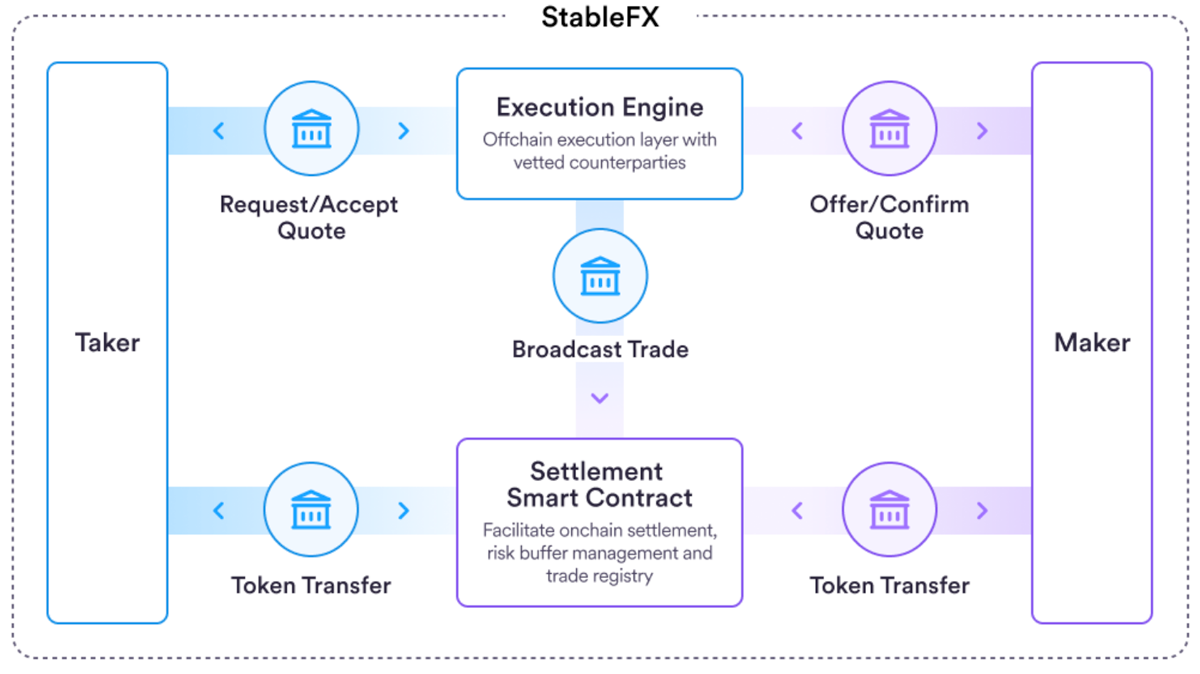
In this blog, the full taker workflow is demonstrated using the StableFX API, from requesting a quote to completing PvP settlement. This includes using Circle Wallets for wallet creation and signing EIP-712 typed data, along with direct API calls for StableFX interactions such as requesting quotes, creating trades, and submitting funding to settle the trade onchain.
Prerequisites
StableFX is a permissioned product that is available only to institutions that have completed Circle’s KYB/AML verification.
Before you begin, you’ll need:
- StableFX API key: Reach out to your Circle representative to get an API key for StableFX.
- Circle Developer Console API key and Entity Secret
- Registered Entity Secret Ciphertext
- Wallets – used in this guide to sign EIP-712 typed data for both trade intent and Permit2 funding.
StableFX runs on Arc (currently in public testnet), which is open for anyone to access. For more information, check out Arc developer documentation.
1. Creating a Wallet on Arc Testnet
To interact with StableFX, you first need a wallet on Arc Testnet capable of holding and transferring USDC or other supported stablecoins. The Circle Node.js SDK provides a simple way to create wallets programmatically.
import { initiateDeveloperControlledWalletsClient } from "@circle-fin/developer-controlled-wallets";
import * as dotenv from "dotenv";

dotenv.config();

// Initialize the Developer-Controlled Wallets client
const client = initiateDeveloperControlledWalletsClient({
  apiKey: process.env.CIRCLE_API_KEY,
  entitySecret: process.env.CIRCLE_ENTITY_SECRET,
});

// Create a wallet set
const walletSet = await client.createWalletSet({ name: "stablefx-demo" });

// Create a wallet on Arc Testnet
const wallets = await client.createWallets({
  blockchains: ["ARC-TESTNET"],
  count: 1,
  walletSetId: walletSet.data?.walletSet?.id,
});

const wallet = wallets.data?.wallets?.[0];
const walletId = wallet?.id;
const walletAddress = wallet?.address;
This wallet will be used to hold USDC on Arc Testnet, sign EIP-712 typed data, and deliver funds during settlement.
2. Fund the Wallet
Before interacting with StableFX, fund the wallet with at least 10 USDC (Arc Testnet) using either faucet:
3. One-Time Permit2 Approval
Before the wallet can deliver USDC during settlement, it must approve that USDC can be transferred by the settlement contract. StableFX uses Permit2, an approval mechanism developed by Uniswap that builds on the standard ERC-20 allowance model.
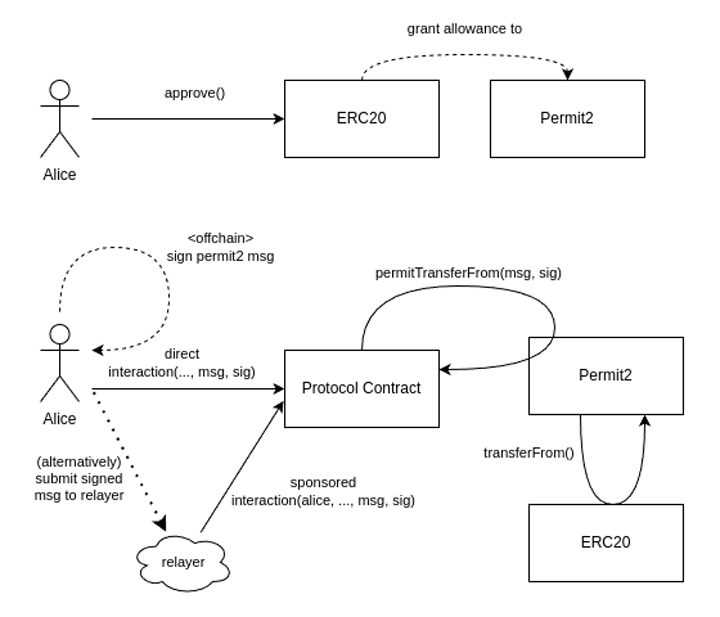
Traditionally, ERC-20 approvals require users to submit a separate approve() transaction for every protocol they interact with. This results in:
- repeated approvals and poor UX
- Large, long-lived allowances granted to many contracts
EIP-2612 improved this model with off-chain permit signatures, but only applies to tokens that implement the extension.
Permit2 generalizes these benefits to all ERC-20 tokens, including USDC on Arc. It works in two steps:
- A one-time approval is granted to the Permit2 contract
- Future transfers rely on Permit2 EIP-712 messages instead of repeated
approve()calls
This allows StableFX to use signed EIP-712 payloads for settlement without modifying token allowances. StableFX uses two separate EIP-712 signatures later in the workflow: one for trade intent and one for funding authorization. The Permit2 approval below enables these signatures.
const response = await client.createContractExecutionTransaction({
  walletId: walletId,
  contractAddress: "0x3600000000000000000000000000000000000000",
  abiFunctionSignature: "approve(address,uint256)",
  abiParameters: [
    "0x000000000022D473030F116dDEE9F6B43aC78BA3",
    (BigInt(2) ** BigInt(256) - BigInt(1)).toString()
  ],
  fee: {
    type: "level",
    config: {
      feeLevel: "MEDIUM"
    }
  }
});
4. Request a Quote
With the wallet funded and Permit2 approved, begin a StableFX trade by requesting a quote for the desired stablecoin pair:
curl --request POST \
  --url https://api-sandbox.circle.com/v1/exchange/stablefx/quotes \
  --header "Authorization: Bearer ${STABLEFX_API_KEY}" \
  --header "Content-Type: application/json" \
  --data '{
    "from": { "currency": "USDC", "amount": "1000.00" },
    "to":   { "currency": "EURC" },
    "tenor": "instant"
  }'
Example response:
{
  "id": "c4d1da72-111e-4d52-bdbf-2e74a2d803d5",
  "rate": "0.9150",
  "from": {
    "currency": "USDC",
    "amount": "1000.00"
  },
  "to": {
    "currency": "EURC",
    "amount": "915.00"
  },
  "timestamp": "2025-08-07T11:00:00Z",
  "expiry": "2025-08-07T11:05:00Z",
  "fee": {
    "currency": "USDC",
    "amount": "1.50"
  }
}
Store the id field as the quoteId, which is required when creating the trade in the next step.
5. Create the Trade
After accepting the quote, create a trade to lock in its parameters:
curl --request POST \
  --url https://api-sandbox.circle.com/v1/exchange/stablefx/trades \
  --header 'Accept: application/json' \
  --header 'Authorization: Bearer ${STABLEFX_API_KEY}' \
  --header 'Content-Type: application/json' \
  --data '{
    "idempotencyKey": "${randomUUID}",
    "quoteId": "${stablefx_quote_id}"
  }'
Example response:
{
  "id": "uuid-trade",
  "from": {
    "currency": "USDC",
    "amount": "1000.00"
  },
  "to": {
    "currency": "EURC",
    "amount": "915.00"
  },
  "status": "created",
  "createDate": "2025-08-07T11:01:00Z",
  "updateDate": "2025-08-07T11:01:00Z",
  "quoteId": "uuid-quote",
  "rate": "0.9150"
}
The trade is now in the created state and ready for intent confirmation.
6. Confirm Trade Intent
StableFX requires takers to explicitly confirm the trade by signing an EIP-712 typed-data payload containing the quote details. This signature authorizes the trade parameters but does not move any funds.
6.1. Generate Trade Presign Data
Retrieve the typed data that must be signed:
curl --request GET \
  --url "https://api-sandbox.circle.com/v1/exchange/stablefx/signatures/presign/taker/uuid-trade?recipientAddress=${RECIPIENT_ADDRESS}" \
  --header 'Authorization: Bearer ${STABLEFX_API_KEY}'
Example response:
{
  "data": {
    "typedData": {
      "domain": {
        "name": "FxEscrow",
        "version": "1",
        "chainId": 5042002,
        "verifyingContract": "0x1f91886c7028986ad885ffcee0e40b75c9cd5ac1"
      },
      "types": {
        "EIP712Domain": [
          {
            "name": "name",
            "type": "string"
          },
          {
            "name": "version",
            "type": "string"
          },
          {
            "name": "chainId",
            "type": "uint256"
          },
          {
            "name": "verifyingContract",
            "type": "address"
          }
        ],
        "Consideration": [
          {
            "name": "quoteId",
            "type": "bytes32"
          },
          {
            "name": "base",
            "type": "address"
          },
          {
            "name": "quote",
            "type": "address"
          },
          {
            "name": "baseAmount",
            "type": "uint256"
          },
          {
            "name": "quoteAmount",
            "type": "uint256"
          },
          {
            "name": "maturity",
            "type": "uint256"
          }
        ],
        "TakerDetails": [
          {
            "name": "consideration",
            "type": "Consideration"
          },
          {
            "name": "recipient",
            "type": "address"
          },
          {
            "name": "fee",
            "type": "uint256"
          },
          {
            "name": "nonce",
            "type": "uint256"
          },
          {
            "name": "deadline",
            "type": "uint256"
          }
        ]
      },
      "primaryType": "TakerDetails",
      "message": {
        "consideration": {
          "quoteId": "0x00000000000000000000000000000000f054a0d91c1747f3be7885d5c38dd0f1",
          "base": "0x89B50855Aa3bE2F677cD6303Cec089B5F319D72a",
          "quote": "0x3600000000000000000000000000000000000000",
          "quoteAmount": 1000000000,
          "baseAmount": 908250000,
          "maturity": 1762189673
        },
        "fee": 181650,
        "nonce": 25426119,
        "deadline": 1762188474,
        "recipient": "0x379c868f6064d9c0564df05dcca170d64f8aa5e3"
      }
    }
  }
}
Pass the typedData object directly to Wallets for signing.
6.2. Sign Trade Intent
Use Circle Developer-Controlled Wallets to sign the EIP-712 payload:
const response = await client.signTypedData({
  walletId: walletId,
  data: JSON.stringify(tradeTypedData)
});

const tradeSignature = response.data?.signature;
This produces the taker signature for the trade intent.
6.3. Submit the trade signature
Submit the signature along with the fields from typedData.message:
curl --request POST \
  --url https://api-sandbox.circle.com/v1/exchange/stablefx/signatures \
  --header 'Authorization: Bearer ${STABLEFX_API_KEY}' \
  --header 'Content-Type: application/json' \
  --data '{ ... }'
If accepted, StableFX returns a blank 200 response.
6.4. Confirm the trade is ready for funding
Check that the trade has moved to pending_settlement:
curl --request GET \
  --url "https://api-sandbox.circle.com/v1/exchange/stablefx/trades/${TRADE_ID}?type=taker&status=pending_settlement" \
  --header 'Authorization: Bearer ${STABLEFX_API_KEY}'
7. Complete Funding
Once the trade is in pending_settlement, StableFX requires a second EIP-712 signature that authorizes Permit2 to transfer the exact USDC amount for this trade.
7.1. Generate Funding Presign Data
Request the EIP-712 typed data for the funding step. This payload encodes a PermitWitnessTransferFrom structure:
curl --request POST \
  --url https://api-sandbox.circle.com/v1/exchange/stablefx/signatures/funding/presign \
  --header "Authorization: Bearer ${STABLEFX_API_KEY}" \
  --header "Content-Type: application/json" \
  --data '{
    "contractTradeIds": ["${CONTRACT_TRADE_ID}"],
    "type": "taker"
  }'
Example response:
{
  "typedData": {
    "domain": {
      "name": "Permit2",
      "chainId": 11155111,
      "verifyingContract": "0xffd21ca8F0876DaFAD7de09404E0c1f868bbf1AE"
    },
    "types": {
      "EIP712Domain": [
        {
          "name": "name",
          "type": "string"
        },

        {
          "name": "chainId",
          "type": "uint256"
        },

        {
          "name": "verifyingContract",
          "type": "address"
        }
      ],
      "TokenPermissions": [
        {
          "name": "token",
          "type": "address"
        },

        {
          "name": "amount",
          "type": "uint256"
        }
      ],
      "SingleTradeWitness": [
        {
          "name": "id",
          "type": "uint256"
        }
      ],
      "PermitWitnessTransferFrom": [
        {
          "name": "permitted",
          "type": "TokenPermissions"
        },

        {
          "name": "spender",
          "type": "address"
        },

        {
          "name": "nonce",
          "type": "uint256"
        },

        {
          "name": "deadline",
          "type": "uint256"
        },

        {
          "name": "witness",
          "type": "SingleTradeWitness"
        }
      ]
    },
    "primaryType": "PermitWitnessTransferFrom",
    "message": {
      "permitted": {
        "token": "0xTOKEN",
        "amount": "1000"
      },
      "spender": "0xffd21ca8F0876DaFAD7de09404E0c1f868bbf1AE",
      "nonce": "42",
      "deadline": "1735689600",
      "witness": {
        "id": "10"
      }
    }
  }
}
Use this typedData object exactly as returned.
7.2. Sign Funding Payload
Sign the Permit2 typed-data message using Circle Developer-Controlled Wallets. This authorizes StableFX to transfer the specified amount of USDC from the taker’s wallet.
const response = await client.signTypedData({
  walletId: walletId,
  data: JSON.stringify(funding_typed_data)
});

const fundingSignature = response.data?.signature;
This signature authorizes settlement for this trade only.
7.3. Submit Funding Signature
Submit the signed Permit2 payload back to StableFX:
curl --request POST \
  --url https://api-sandbox.circle.com/v1/exchange/stablefx/fund \
  --header "Authorization: Bearer ${STABLEFX_API_KEY}" \
  --header "Content-Type: application/json" \
  --data '{ ... }'
If accepted, StableFX will execute the taker’s settlement leg onchain using Permit2.
7.4. Confirm Settlement
When the funding signature is accepted, StableFX will pull the taker’s USDC via Permit2 and complete the taker’s leg of settlement. At this point, the trade transitions to:
status = "taker_funded"This indicates that the taker’s funds have been delivered onchain, but the trade is not yet fully settled. StableFX enforces payment-versus-payment (PvP) settlement, so the maker must also complete their leg. Once both sides settle, the trade transitions to:
status = "completed"You can poll for completion using:
curl --request GET \
  --url "https://api-sandbox.circle.com/v1/exchange/stablefx/trades/${TRADE_ID}?type=taker&status=completed" \
  --header "Authorization: Bearer ${STABLEFX_API_KEY}"
A completed trade response includes the onchain settlement transaction hash.
Example response:
{
  "id": "c4d1da72-111e-4d52-bdbf-2e74a2d803d5",
  "contractTradeId": "24",
  "status": "completed",
  "rate": 0.915,
  "from": {
    "currency": "USDC",
    "amount": "1000.00"
  },
  "to": {
    "currency": "EURC",
    "amount": "915.00"
  },
  "createDate": "2023-01-01T12:04:05Z",
  "updateDate": "2023-01-01T12:04:05Z",
  "quoteId": "c4d1da72-111e-4d52-bdbf-2e74a2d803d5",
  "settlementTransactionHash": "0x5ba96ea26172dde9a83b151d1a73f163bafe883f691b80e404b271b00eb86a0a",
  "contractTransactions": {
    "recordTrade": {
      "status": "success",
      "txHash": "0x522a01ed8750423ab213a3d4618f231e0984874509521e98977f017b452cd455",
      "errorDetails": ""
    },
    "takerDeliver": {
      "status": "success",
      "txHash": "0x522a01ed8750423ab213a3d4618f231e0984874509521e98977f017b452cd455",
      "errorDetails": ""
    },
    "makerDeliver": {
      "status": "success",
      "txHash": "0x522a01ed8750423ab213a3d4618f231e0984874509521e98977f017b452cd455",
      "errorDetails": ""
    }
  }
}
You can view the final PvP settlement on Arc Testnet by entering the settlementTransactionHash into ArcScan.
Once the trade is marked as completed, both sides of the stablecoin FX transaction have been settled atomically onchain.
Wrapping up
StableFX introduces a predictable and programmable way to perform onchain FX between fiat-backed stablecoins on Arc. By combining institutional-grade RFQ execution, typed-data intent confirmation, and Permit2-based PvP settlement, StableFX enables onchain cross-currency workflows that settle quickly, transparently, and without bilateral credit exposure.
With Wallets handling secure EIP-712 signatures, and StableFX orchestrating settlement on Arc, developers can now embed stablecoin-denominated FX directly into various economic use cases.
To begin building with StableFX, visit the StableFX documentation and reach out to your Circle representative to request access and obtain your StableFX API key. To learn more about Wallets, explore the Wallets documentation.
Join our community of builders on Arc Community Hub, Arc Discord and Circle Discord, where you can collaborate with other developers, share what you're building, and get support as you experiment on testnet or prepare production workflows. We’re excited to see what you build with StableFX.
StableFX is offered by Circle Technology Services, LLC (“CTS”). CTS is a software provider and does not provide regulated financial or advisory services. You are solely responsible for services you provide to users, including obtaining any necessary licenses or approvals and otherwise complying with applicable laws. StableFX is a collection of API and on-chain smart contracts that enable data sharing between counterparties to a transaction without intermediation by CTS. CTS’s role is limited to broadcasting information between the relevant parties and to the on-chain smart contract that enables settlement directly between the relevant parties. CTS does not accept or transmit digital assets on behalf of StableFX users. The product features described in these materials are for informational purposes only. All product features may be modified, delayed, or cancelled without prior notice, at any time and at the sole discretion of Circle Technology Services, LLC. Nothing herein constitutes a commitment, warranty, guarantee or investment advice.
Arc is offered by Circle Technology Services, LLC (“CTS”). CTS is a software provider and does not provide regulated financial or advisory services. You are solely responsible for services you provide to users, including obtaining any necessary licenses or approvals and otherwise complying with applicable laws.