Execute smart contract calls with Circle Wallets on Arc. Learn how to add fee abstraction, server-side signing, and a smooth onchain experience to wallets.
If you’re new to building on the blockchain, one of the earliest concepts you learn is that the blockchain is a distributed ledger, and you can make changes to the blockchain by writing a transaction to update this distributed ledger.
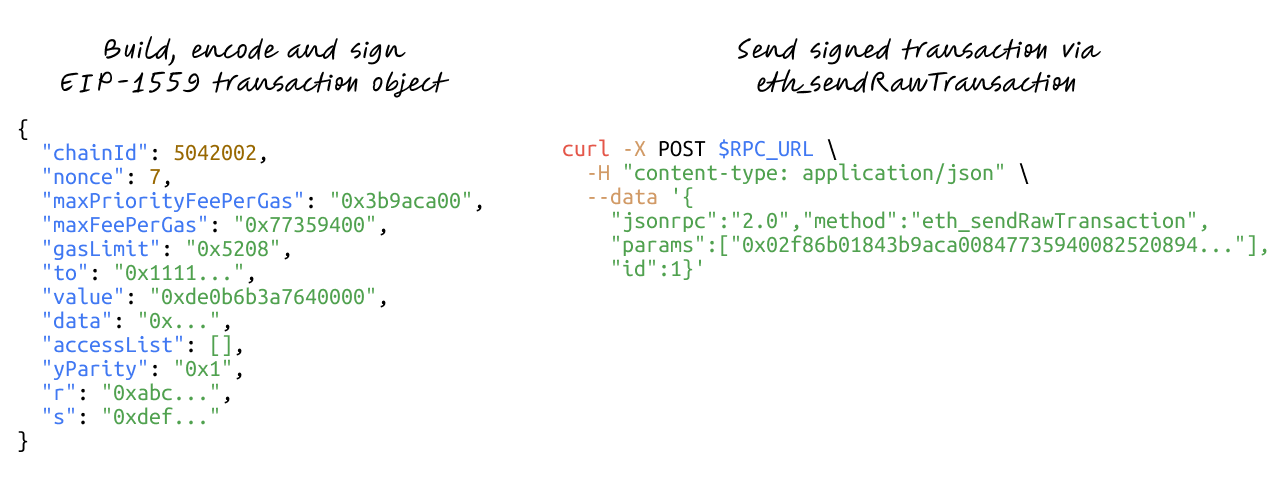
For EVM-compatible chains, the flow can be broadly summarised into:
- Build, encode and sign an EIP-1559 transaction object
- Send the signed transaction to the blockchain using
eth_sendRawTransaction
Most developers building applications on the blockchain never write this flow manually. Instead, they make use of client libraries or SDKs that can abstract this transaction into higher-level methods, which provide a more ergonomic developer experience. If you’re building with Circle Wallets1, the createContractExecutionTransaction method offers a streamlined way to handle this flow.
In this blog post, we will go through how this method works, and how you can use it to execute onchain contract calls, similar to how you would do with libraries like viem or ethers, but from a Circle wallet instead. The SDK also handles fee abstraction, server-side signing, and idempotency for you.
Prerequisites
- Sign up for a Circle Developer Account: To obtain the API key to make use of Circle's Developer Controlled Wallets NodeJS SDK
Creating a developer-controlled wallet on Arc Testnet
Arc2 is an open L1 blockchain purpose-built to unite programmable money and onchain innovation with real-world economic activity. One of its key features is the use of stablecoins as the native gas token, allowing gas fees to be directly paid in USDC (and in the future other supported stablecoins) instead of a separate native gas token.
Once you have your API key and have registered your entity secret, install the Developer Controlled Wallets NodeJS SDK.
npm i @circle-fin/developer-controlled-walletsIn your project, import the factory method initiateDeveloperControlledWalletsClient from the SDK and initialize the client using your API key and entity secret.
import { initiateDeveloperControlledWalletsClient } from "@circle-fin/developer-controlled-wallets"

const client = initiateDeveloperControlledWalletsClient({
  apiKey: "<your-api-key>",
  entitySecret: "<your-entity-secret>",
})
Now, we can make use of the client to create a new developer-controlled wallet on Arc testnet. Developer-controlled wallets are created within a wallet set, which is the source from which individual wallet keys are derived.
const walletSetResponse = await client.createWalletSet({
  name: "WalletSet 1",
})
console.log("Created WalletSet", walletSetResponse.data?.walletSet)

const walletsResponse = await client.createWallets({
  blockchains: ["ARC-TESTNET"],
  count: 2,
  walletSetId: walletSetResponse.data?.walletSet?.id ?? '',
})
console.log("Created Wallets", walletsResponse.data?.wallets)
You should end up with 2 new Externally Owned Account (EOA) developer-controlled wallets that you can also see from the Circle developer console. The response will look something like this:
[
  {
    "id": "a2f67c91-b7e3-5df4-9c8e-42bbd51a9fcb",
    "state": "LIVE",
    "walletSetId": "5c3e9f20-8d4b-55a1-a63b-c21f44de8a72",
    "custodyType": "DEVELOPER",
    "refId": "",
    "name": "",
    "address": "0x9eab451f27dca39bd3f5d76ef28c86cc0b3a72df",
    "blockchain": "ARC-TESTNET",
    "accountType": "EOA",
    "updateDate": "2025-11-07T01:35:03Z",
    "createDate": "2025-11-07T01:35:03Z"
  },
  {
    "id": "c84d12a4-f6a9-5df8-8b44-92ff7cc94e32",
    "state": "LIVE",
    "walletSetId": "5c3e9f20-8d4b-55a1-a63b-c21f44de8a72",
    "custodyType": "DEVELOPER",
    "refId": "",
    "name": "",
    "address": "0xb37ac90d1a657c04a8518b6f7bda2b37e4f8d221",
    "blockchain": "ARC-TESTNET",
    "accountType": "EOA",
    "updateDate": "2025-11-07T01:35:06Z",
    "createDate": "2025-11-07T01:35:06Z"
  }
]
For the rest of this blog post, replace the values with the IDs or addresses of your actual developer-controlled wallet (the values in this post are examples only).
The last preparatory step is to obtain some testnet USDC for executing transactions like making transfers and paying gas fees for those transactions. Circle’s Testnet Faucet provides 10 USDC per hour for your selected chain, in this case, select Arc Testnet, input one of your wallet addresses and you should receive 10 USDC in that wallet.
Executing a Contract Call
We will cover some different contract calls to demonstrate how this createContractExecutionTransaction is the backbone of Circle Wallets. And if you’re new to developing on the blockchain, this can also give you a better idea of how smart contract functions are invoked and executed as onchain transactions.
1. ERC-20 transfer
First up, the classic example of making an ERC-20 transfer. If you had followed the steps in the previous section, you should have 2 EOA developer-controlled wallets on Arc testnet, one of them with 10 USDC, while the other has none.
Let’s transfer some USDC over to the wallet with no balance. For that, we want to call the transfer function on the USDC contract address deployed on Arc testnet.
const response = await client.createContractExecutionTransaction({
  walletId: <wallet-id-with-funds>,
  contractAddress: "0x3600000000000000000000000000000000000000",
  abiFunctionSignature: "transfer(address,uint256)",
  abiParameters: [<recipient-wallet-address>, "1000000"], // Transfer 1 USDC
  fee: {
    type: "level",
    config: {
      feeLevel: "LOW",
    },
  },
});
console.log(response.data)
This returns a response object with a transaction ID and the state of the transaction.
{ id: 'da4e656b-64ce-502a-95b7-8804326f9dbf', state: 'INITIATED' }The SDK provides a convenient way to check on the status of the transaction with the getTransaction method by providing the transaction ID obtained from the previous step.
const response = await client.getTransaction({
  id: "da4e656b-64ce-502a-95b7-8804326f9dbf",
});
console.log(response.data);
You can verify that the transaction was successful by checking the details in the returned object.
{
  transaction: {
    id: 'da4e656b-64ce-502a-95b7-8804326f9dbf',
    blockchain: 'ARC-TESTNET',
    walletId: 'def97330-c3fd-5b3b-ba61-d102bdbebcff',
    sourceAddress: '0xadbb6696ac3a2c5c79facc3d128d581621b61b47',
    contractAddress: '0x3600000000000000000000000000000000000000',
    transactionType: 'OUTBOUND',
    custodyType: 'DEVELOPER',
    state: 'COMPLETE',
    transactionScreeningEvaluation: { screeningDate: '2025-11-17T10:21:49Z' },
    amounts: [],
    nfts: null,
    txHash: '0xb7d85267cf310f4c262adbcf8487b1c5a65f3815361ea5f7f25af4dbcc5da37d',
    blockHash: '0x577b61997d4564161b28f4521807fa69d60102f07fc11a2936b43a72c1510b89',
    blockHeight: 11621938,
    networkFee: '0.00922921088396605',
    firstConfirmDate: '2025-11-17T10:21:51Z',
    operation: 'CONTRACT_EXECUTION',
    feeLevel: 'LOW',
    estimatedFee: {
      gasLimit: '74721',
      networkFee: '0.024597264059776851',
      baseFee: '160',
      priorityFee: '9.188100531',
      maxFee: '329.188100531'
    },
    refId: '',
    abiFunctionSignature: 'transfer(address,uint256)',
    abiParameters: [ '0xdb59fc8ead9b7644de42a19029e9a3bd06b09173', '1000000' ],
    createDate: '2025-11-17T10:21:49Z',
    updateDate: '2025-11-17T10:21:51Z'
  }
}
2. ERC-20 approve
The first step to most DeFi actions is approve, which gives another address permission to move your tokens up to a specified limit. This is also the first step for Circle’s crosschain transfer protocol (CCTP).
const response = await client.createContractExecutionTransaction({
  walletId: <wallet-id-with-funds>,
  contractAddress: "0x3600000000000000000000000000000000000000",
  abiFunctionSignature: "approve(address,uint256)",
  abiParameters: [<spender-address>, "10000000"], // Spending limit of 10 USDC
  fee: {
    type: "level",
    config: {
      feeLevel: "LOW",
    },
  },
});
console.log(response.data)
As before, you will receive a transaction ID, which you can then call getTransaction with to verify the status of the transaction.
3. Custom “HelloNumber” contract
The previous 2 examples were functions on the USDC contract on Arc testnet. If you’re building something completely new, then odds are you will be deploying a completely new smart contract to the network and calling those functions. For this example, we will be calling a “HelloNumber” contract (0xc300f6DE4E0430e02cb451DA55B608FC3E99B182) deployed on Arc testnet.
If you examine the contract on the Arc testnet explorer, you will see that it only has 2 functions, getFavouriteNumber and setFavouriteNumber. Let’s try to set your favourite number.
const response = await client.createContractExecutionTransaction({
  walletId: <wallet-id-with-funds>,
  contractAddress: "0xc300f6DE4E0430e02cb451DA55B608FC3E99B182",
  abiFunctionSignature: "setFavouriteNumber(uint256)",
  abiParameters: ["23"], // Set favourite number value to 23
  fee: {
    type: "level",
    config: {
      feeLevel: "LOW",
    },
  },
});
console.log(response.data)
Once you verify that the status of the transaction is complete with getTransaction, you can check that the message has been updated on the Arc testnet explorer.

You can also see all onchain transactions that interacted with this contract under the “Transactions” tab in the Arc testnet explorer.
Wrapping up
By the end of this blog post, you’ve seen how writing onchain logic can be like building with any other API-driven workflow when using the Circle Developer Controlled Wallets NodeJS SDK. We also encourage you to join our community of builders on both the Circle Developer Discord, as well as the Arc community hub, where you can share what you have built, and also ask for support when you need it.
1 Circle Wallets are provided by Circle Technology Services, LLC (“CTS”). CTS is a software provider and does not provide regulated financial or advisory services. You are solely responsible for services you provide to users, including obtaining any necessary licenses or approvals and otherwise complying with applicable laws. For additional details, please see the Circle Developer Terms of Service.
2 Arc testnet is offered by Circle Technology Services, LLC (“CTS”). CTS is a software provider and does not provide regulated financial or advisory services. You are solely responsible for services you provide to users, including obtaining any necessary licenses or approvals and otherwise complying with applicable laws.
Arc has not been reviewed or approved by the New York State Department of Financial Services
The product features described in these materials are for informational purposes only. All product features may be modified, delayed, or cancelled without prior notice, at any time and at the sole discretion of Circle Technology Services, LLC. Nothing herein constitutes a commitment, warranty, guarantee or investment advice.